
Resolve Agent
Resolve agent 2.0 is an AI agent designed to help developers in the process of resolving mobile app crashes, enabling them to resolve issues within minutes. Built on top of Luciq's crash reporting, Resolve agent analyzes crash data, generates actionable code fix suggestions, gets the developer's feedback and regenerates a new fix accordingly, and creates pull requests to integrate these fixes into the codebase, ultimately improving app stability and reducing time to resolution.
How to use it?
Resolve agent currently works on top of the Crash Reporting product, and it requests connecting your github repository to be able to identify crashes root cause and suggest code fixes.
To enable the Resolve agent on your account, please connect with our support team or ask your designated customer success manager. To connect your GitHub repository, check Source code connection docs
Once the feature is enabled for your account, you will be able to:
-
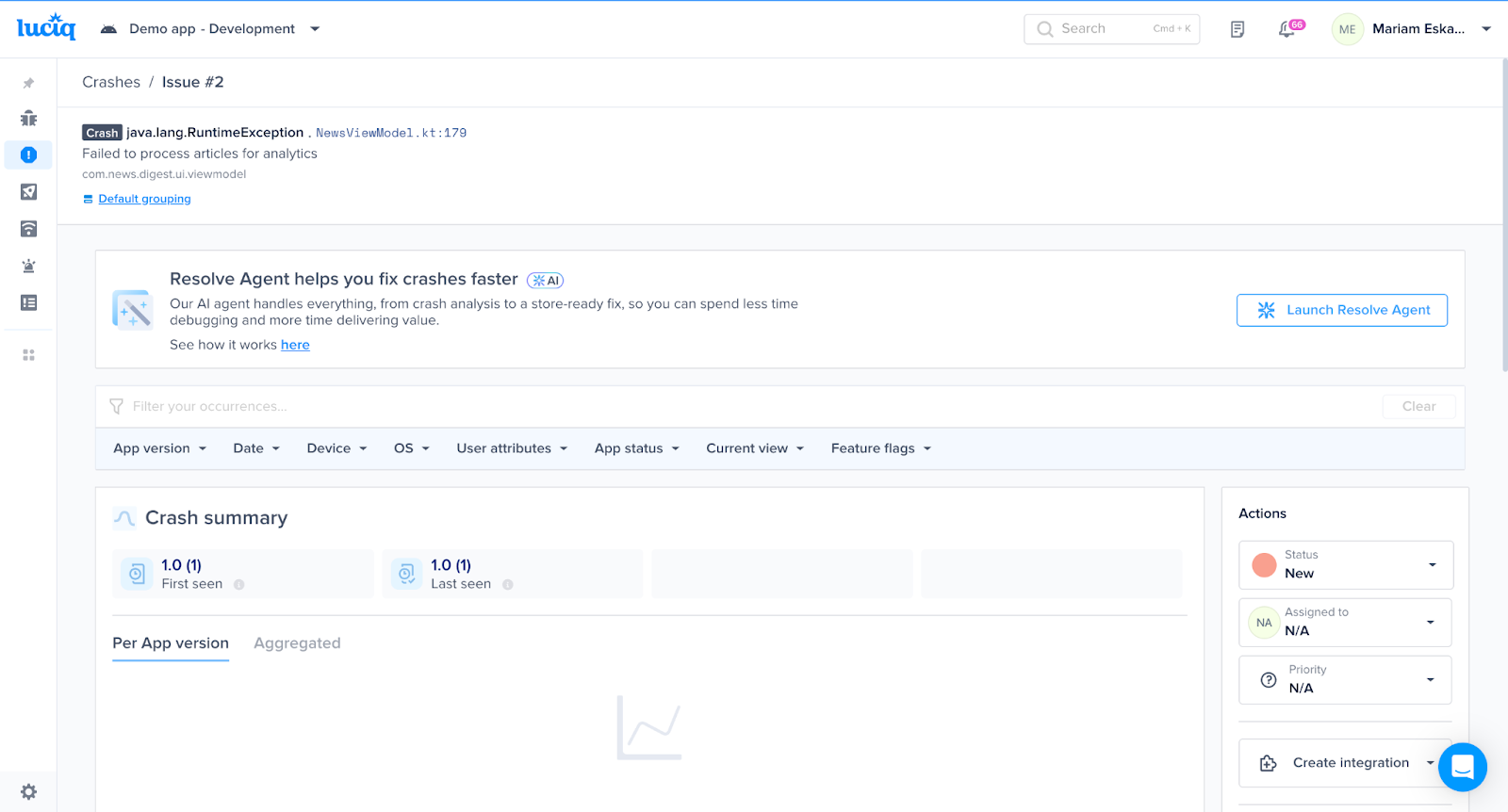
See the Resolve agent widget at the top of each crash details page, where you can initiate “Launch Resolve Agent” to start the crash analysis and fix generation process.
-
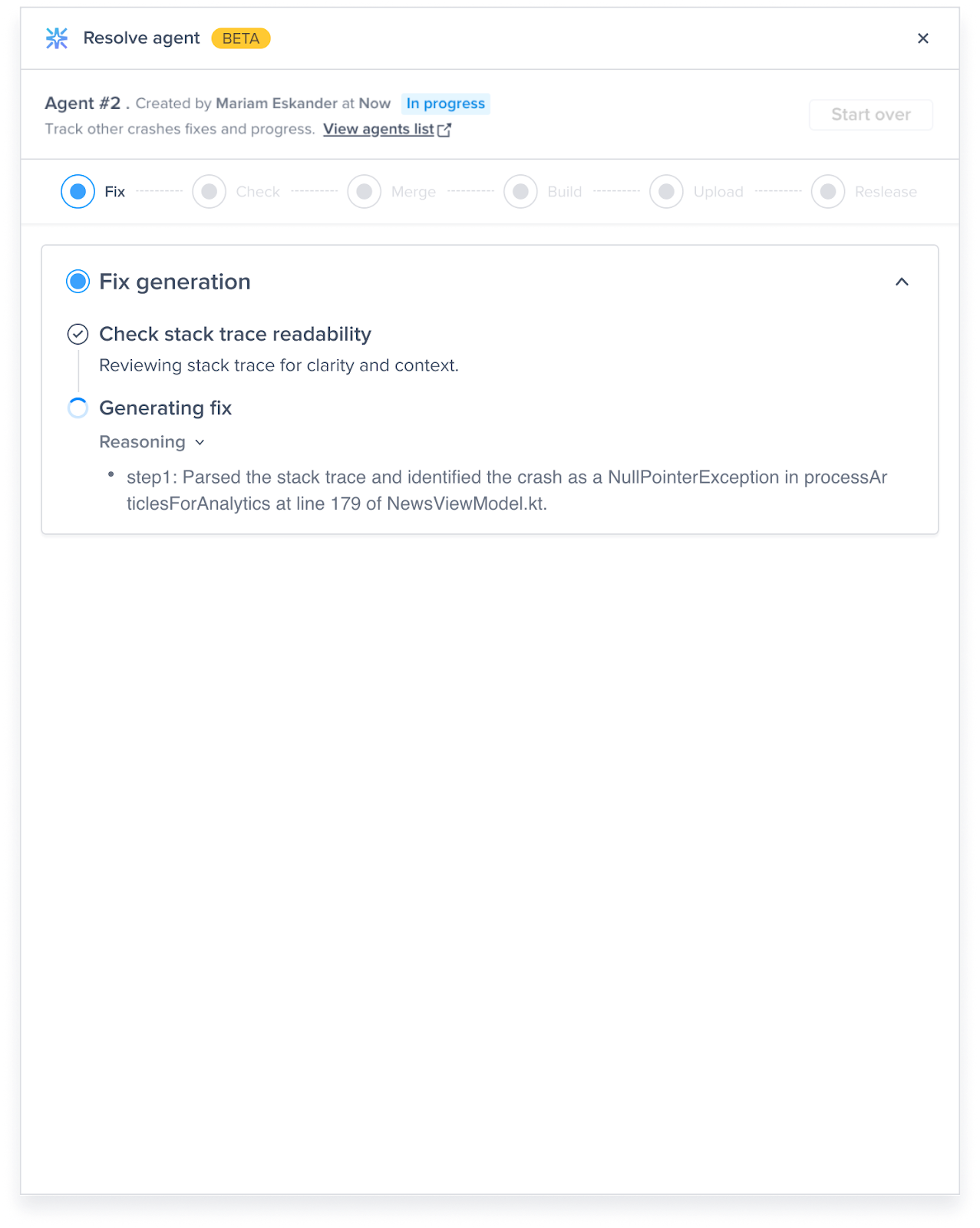
Once “Launch Resolve Agent” is clicked, the analysis and fix generation are initiated, you will be able to see the reasoning steps while the agent generating the fix. The process usually takes 10 - 30 seconds to complete.
-
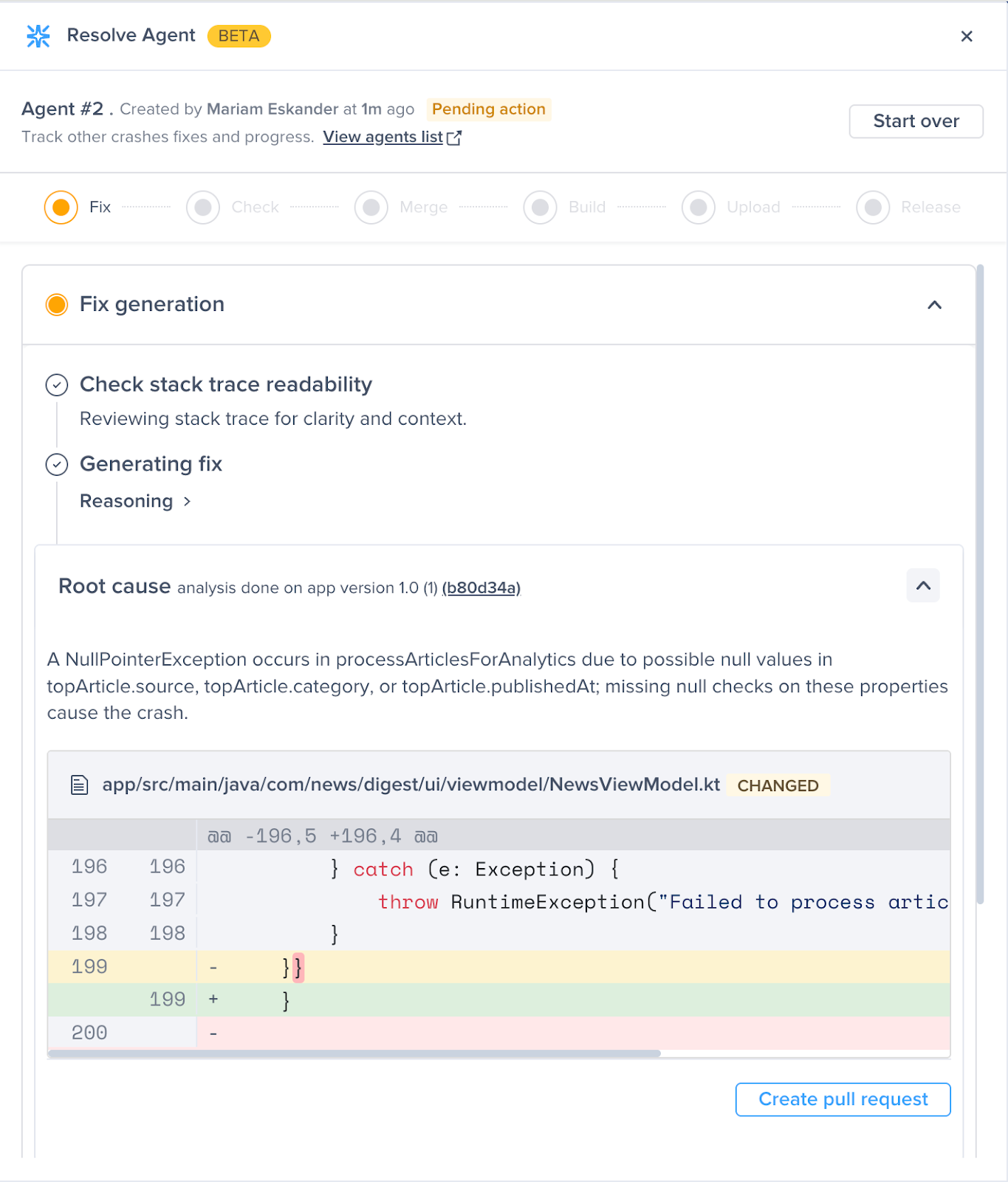
After the process completion, you will be presented with a root cause analysis and a suggested fix to the crash, which you should be able to check right in the dashboard.
-
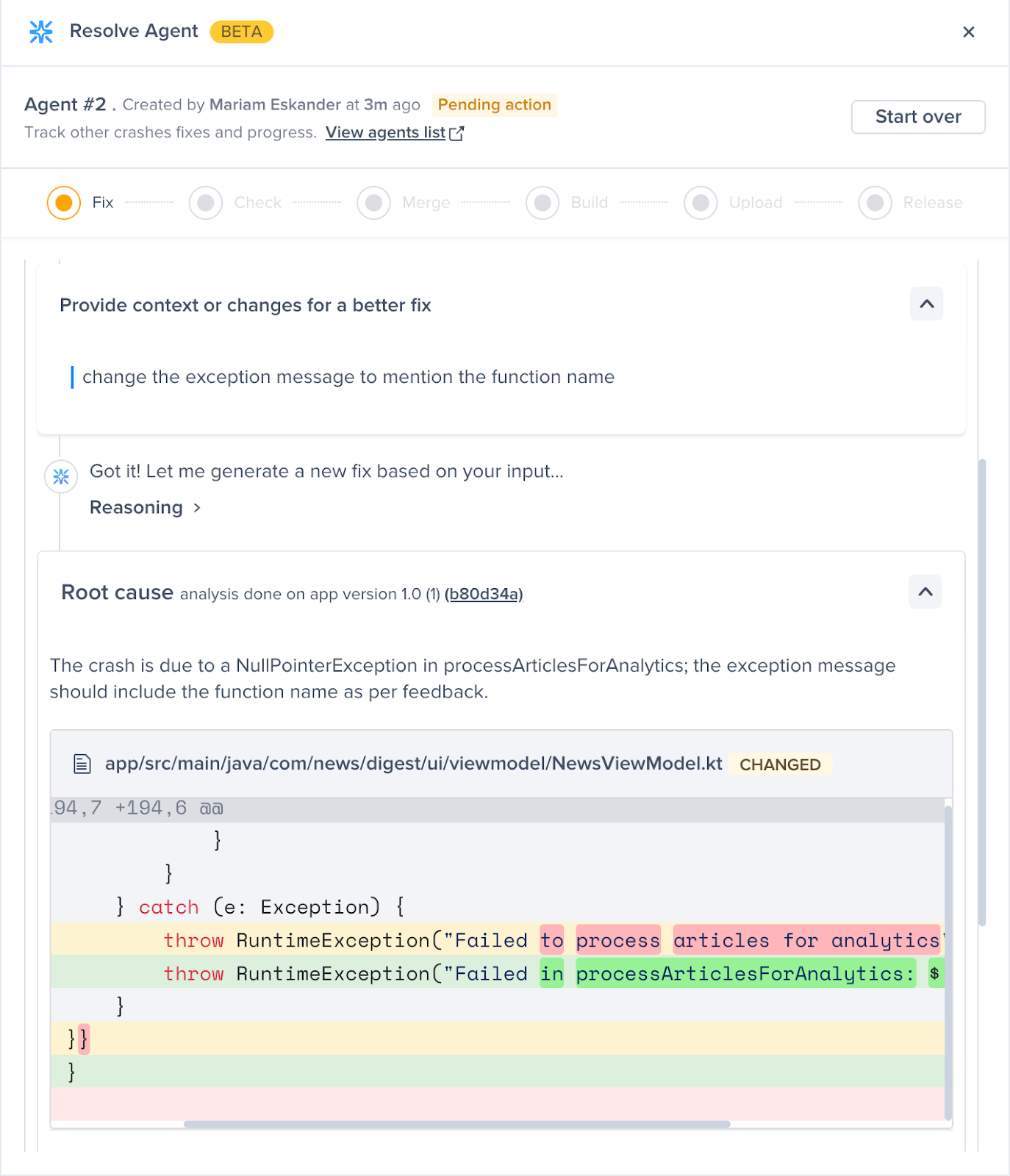
If the generated fix doesn't fully resolve the issue, you can provide your feedback. The AI will use it to regenerate an improved code fix tailored to your input.
-
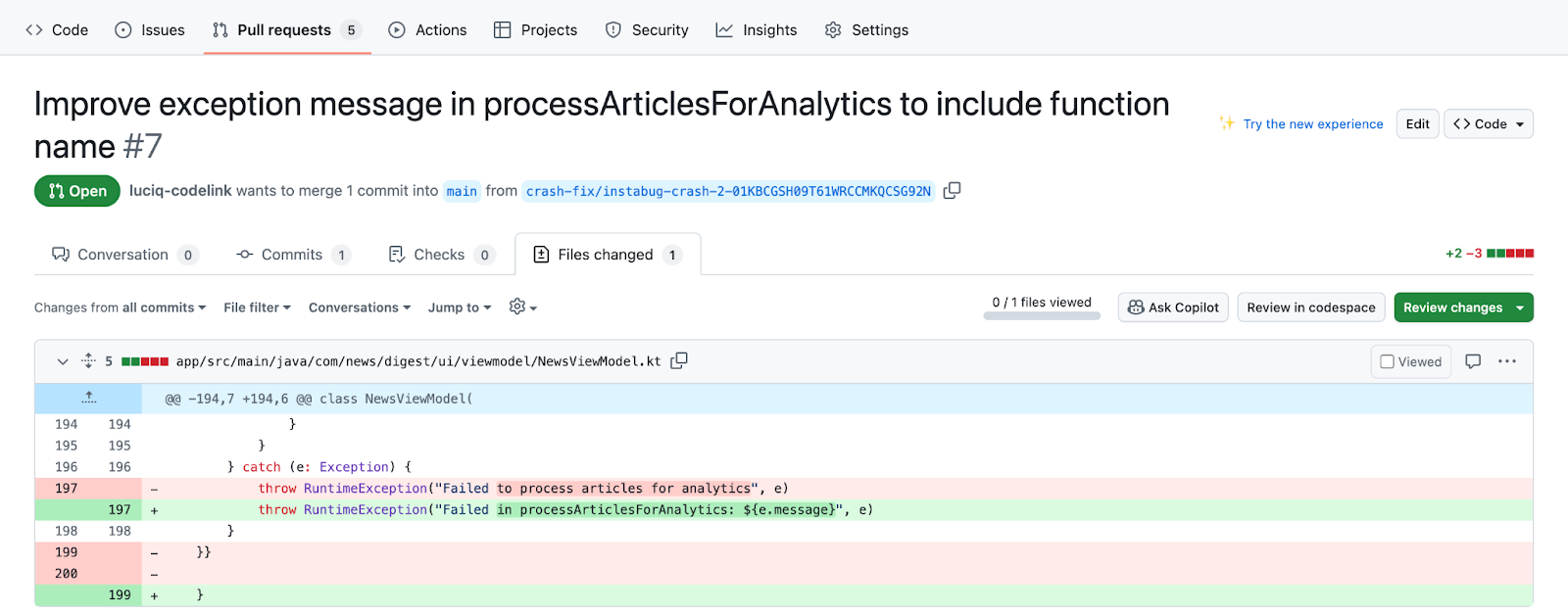
If you think the fix is suited to resolve your crash, you can click on “Create pull request”, which will generate a pull request right into your application source code repository. You can review the pull request inside of your git provider and decide if you want to merge it right away or change anything before you merge it.
You can also perform the following actions once you have fixes generated for a specific crash.
- View generated fixes. The fixes generated are saved for future use, where you or other members of your team can check them out.
- Giving feedback to generate one more fix, where you can generate another fix suggestion if the generated ones are not suitable for resolving the crash.
- Start Over, where you want to delete all previous fixes and want to start the analysis from the beginning. Usually used when a new app version is available and the fixes were generated on an older version.
How does it work?
App Source Code Integration
Resolve agent depends on having access to the application source code, in order to detect the root cause of the crash in the app codebase and suggest a code fix.
Crash & Code Analysis
Resolve agent starts by understanding the app's source code and how different pieces of code work together, then translating that into embeddings. Once a crash needs to be fixed, the Resolve agent starts to analyze crash data and its stack trace and starts to identify code pieces that are relevant to the crash using advanced RAG techniques.
Fix Generation
Once the crash-relevant code is fetched, and the root cause is identified, Resolve agent uses LLM models like OpenAI’s GPT, and Anthropic’s Claude to generate the fix needed to resolve the crash, which will be presented to the developer to evaluate.
Giving Feedback
If the developer is not satisfied with the generated crash fix, or if it doesn’t fully resolve the issue, they can provide feedback, and a new, improved fix will be generated based on their input.
Pull Request Creation
Once the developer is satisfied with one of the crash fixes generated and uses it as a fix, Resolve agent uses our source code integration to create a pull request in the app source code. This pull request should enable other developers to manually review it or for CI quality and security checks to run against it before it gets merged into the app's main code.
Compatibility
Resolve agent is available for Both Native Android and iOS platforms and React Native, and it currently can be integrated with source code from GitHub.
How do I get started with the Resolve agent?
Resolve agent 2.0 is currently available in a private beta program. To join the beta, admins or owners of a Luciq account can request enrollment by contacting their Customer Success Manager or reaching out to Luciq Support.
Eligibility and Consent
Only account admins or owners are eligible to request enrollment in the beta program. By requesting to join, you grant Luciq permission to process crash data and application source code through its AI models (both custom and third-party) in compliance with our privacy policy and security standards. Note that processing will only occur once the feature is activated, and you can request to disable the feature at any time.
What to Expect
- Beta Duration and Cost: The feature will be free for a minimum of three months after activation, with the possibility of extension based on individual cases.
- Integration: Detailed instructions will be provided to connect your application's source code to Luciq using GitHub Application.
- Team Access: Your team will gain full access to the feature for testing and feedback.
- Feedback Commitment: To ensure continuous improvement, we will request feedback from your team on a monthly basis, coordinated by our team.
Updated 11 days ago